Features
One system for the entire apparel manufacturing chain
From the tech pack to shipping and in-store sales. Every module works with the same size-and-color quantity matrix, so nothing gets entered twice.
What's included
Modules by business area
Jump straight to the module you're interested in.
Sales and orders
Production
Inventory and shipping
Control and analytics
Tech packs
A complete tech pack for every style, all in one place
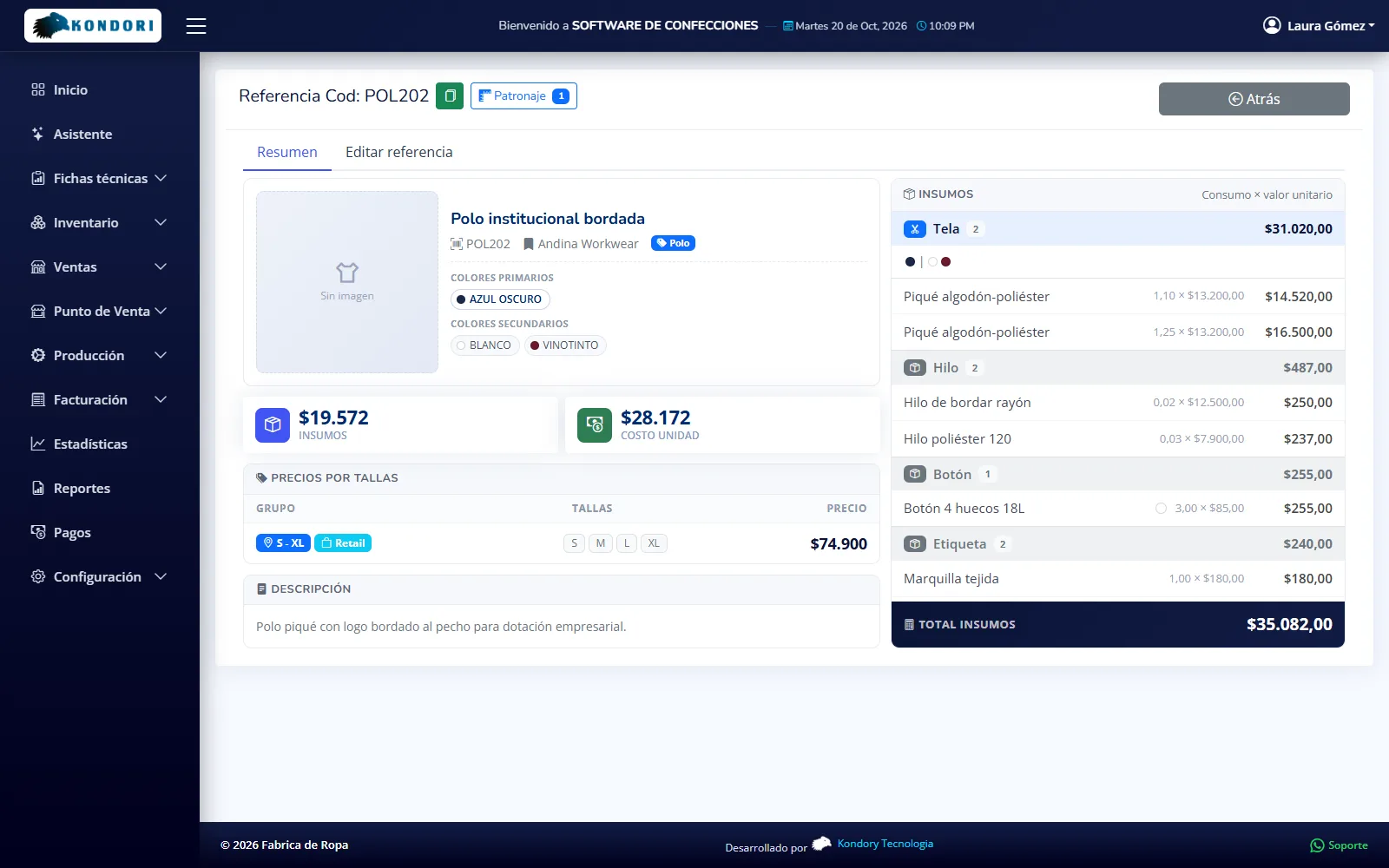
Every garment with its style number, garment type, brand, collection, size range, colors and materials with their consumption. The tech pack drives the sales order, production, labels and selling price.
- Materials with consumption and waste
- Fabric, thread, buttons and labels with their consumption, the waste allowance percentage and the value taken from the lot or the yearly average.
- Pricing by size group and market
- Fixed cost and markup factor by collection; prices for domestic, export or big-box retail, wholesale or retail, with color surcharges and conversion to US dollars.
- Garment components
- Top and bottom with their own materials, for sets and uniforms produced in parts.
- Apparel master data
- Garment types, categories, sortable size ranges, colors, brands, collections and suppliers. Duplicate a style to create its export version.
Pattern making
From pattern to style, with the cost calculated before production
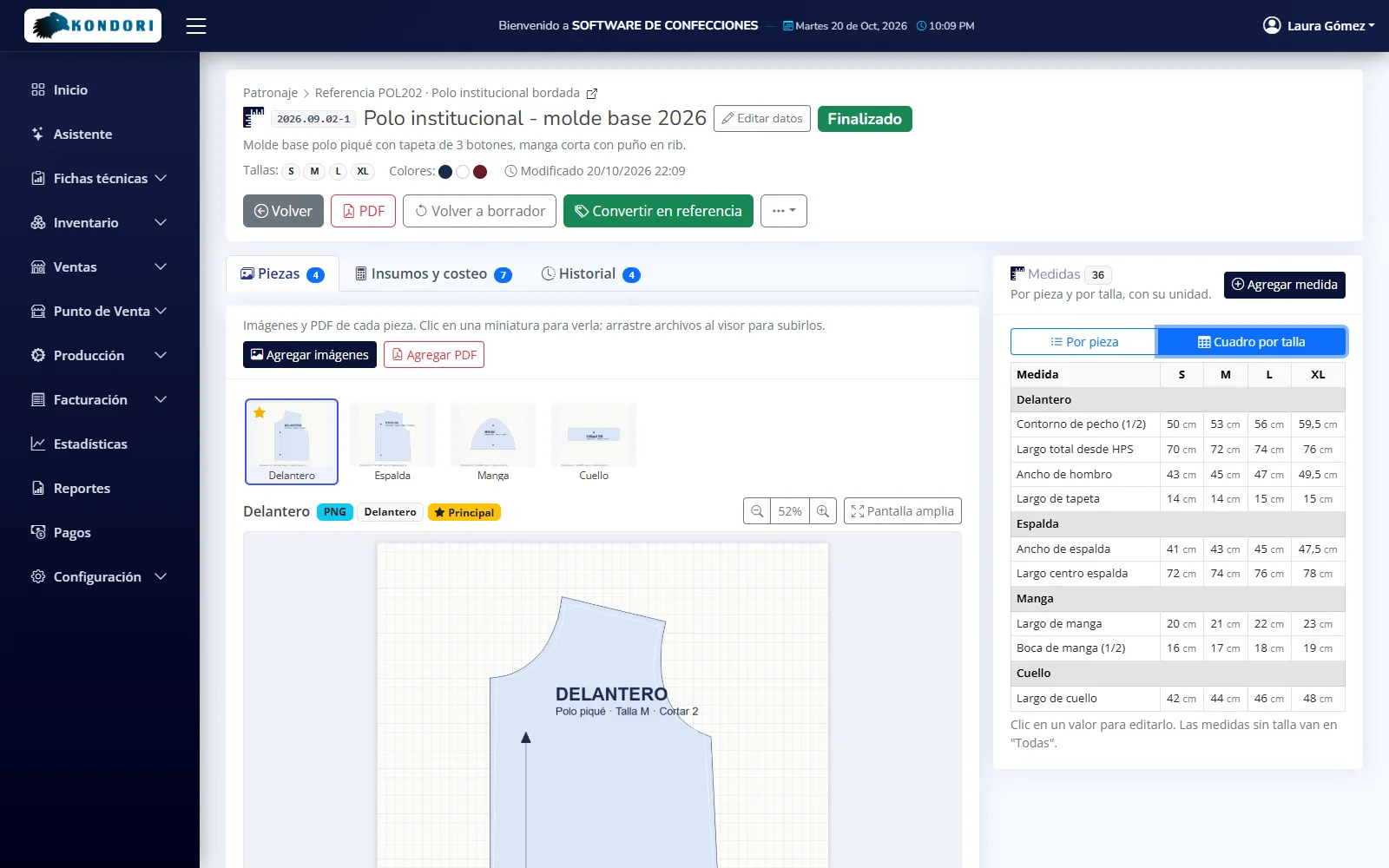
A pattern library with each piece as an image and PDF, a size spec chart and a pre-costing with suggested price and margin. Once the pattern is approved, it becomes a style in one click.
- Pieces and size spec chart
- Each piece with its image or PDF and measurements by size in millimeters, centimeters, meters or inches.
- Pre-costing
- Materials at the latest lot value, fixed cost, suggested price and margin, before you commit to production.
- PDF spec sheet and history
- Pattern making spec sheet in PDF and a record of every change, from draft to final.
Sales orders
Size-and-color orders, from the sales rep to the factory floor
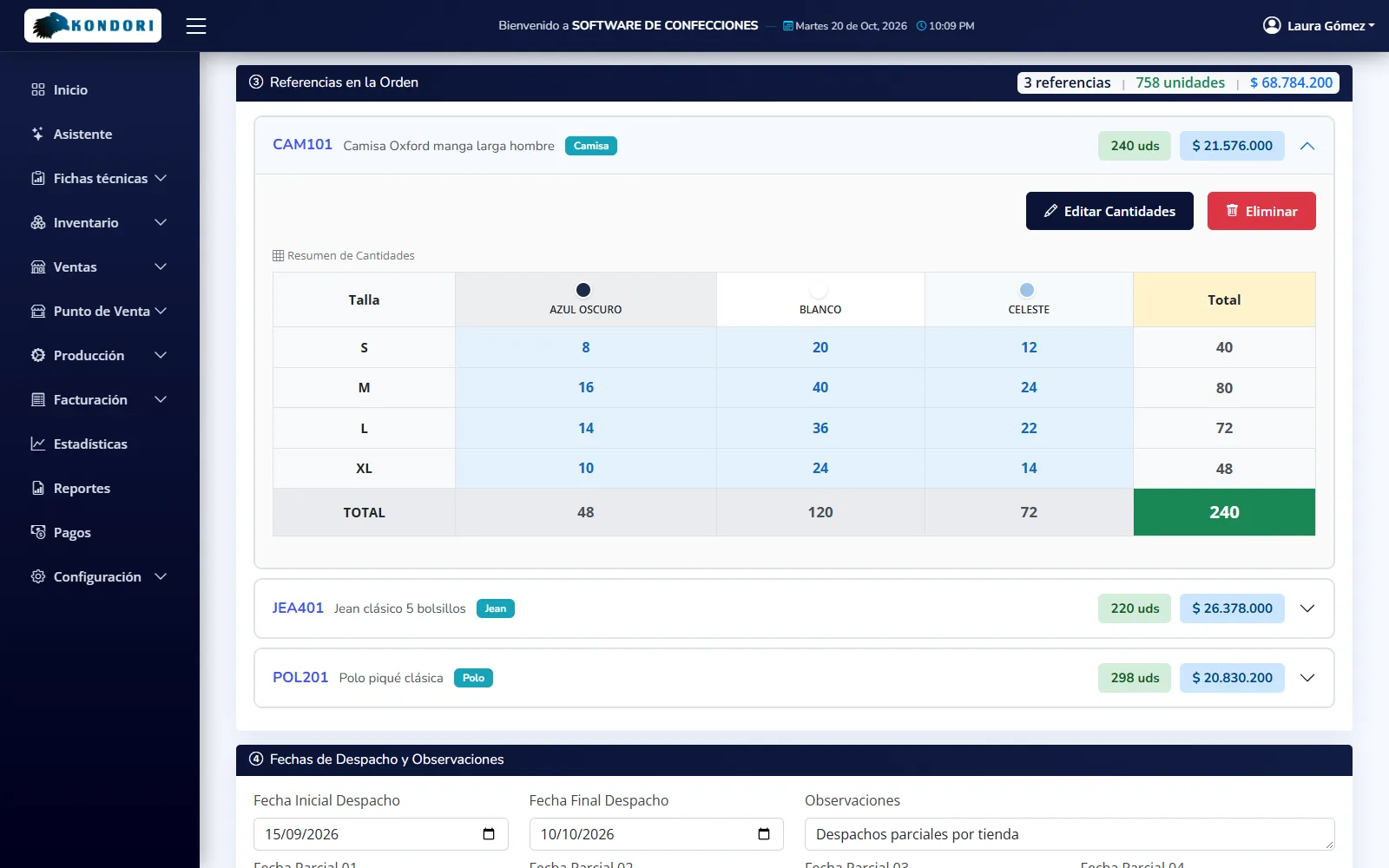
The sales order is filled in on each style's size-and-color quantity matrix, with its collection, market and up to four partial shipment dates. The price comes from the tech pack: nobody types it in.
- Bulk import from Excel
- One row per style and color, one column per size. The template blocks entries in sizes the style doesn't come in, and production orders can be created in the same step.
- PDF by email when the order is created
- The customer, the person who entered it and the administrators receive the order as a PDF, with payment terms and space for signatures.
- Customers, branches and sales reps
- Tax ID (NIT) with automatic check digit, payment terms, tax regime, branches with their sales rep, and zones for sales analysis.
- Material yield
- Calculates how many garments you can get from the fabric in your warehouse, splits them by style and size, and generates the order.
Point of sale
Your store or factory outlet, in the same system
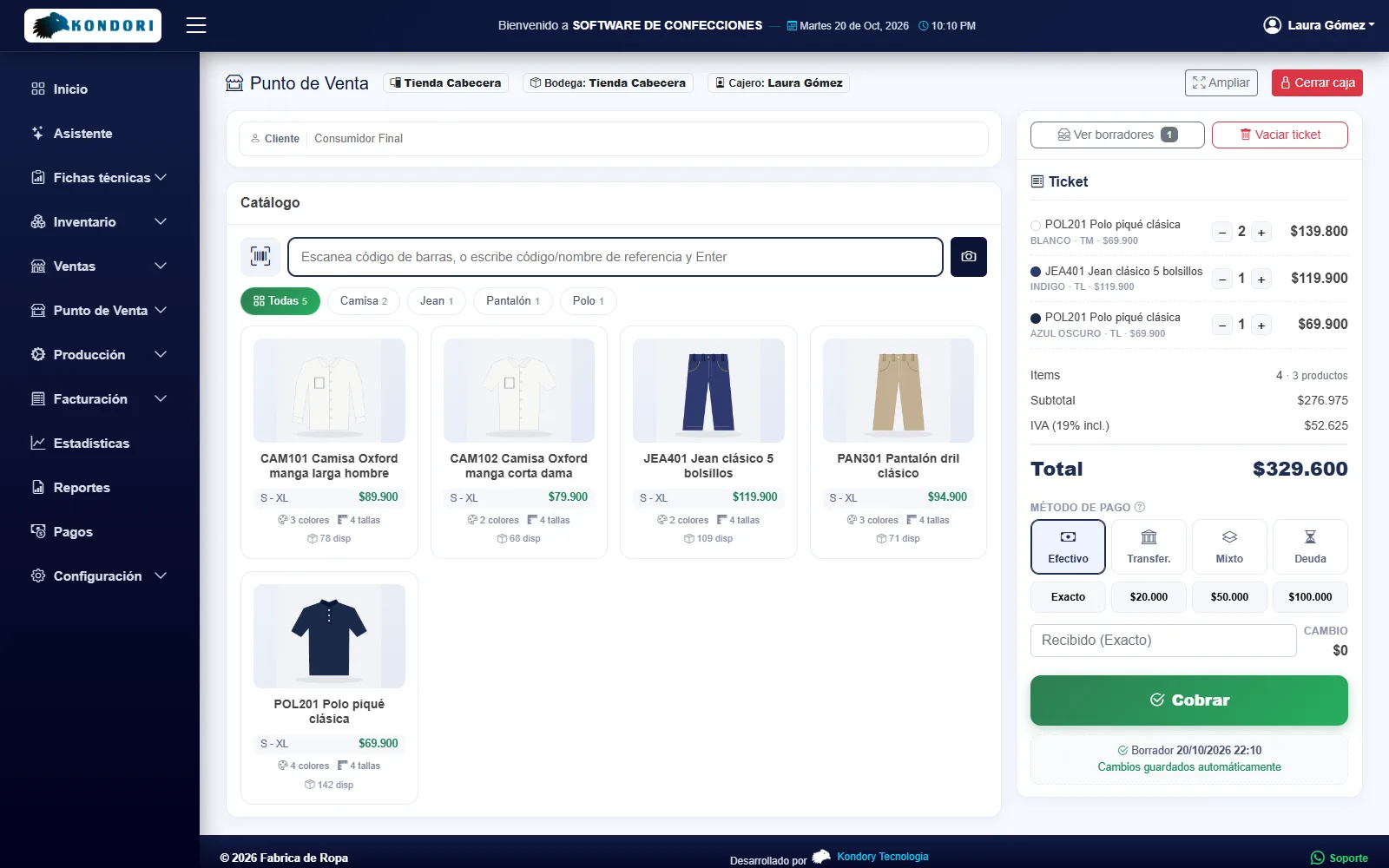
Sell from each store's warehouse with a barcode scanner or the phone camera. Cash, bank transfer, split payment or store credit with installments, receipts on a thermal printer and register closeout.
- Stores and registers
- Each store with its own warehouse, configurable VAT (included in the price or not) and the option to sell without stock on hand.
- Store credit, installments and returns
- Credit sales with their balance, installment payment tracking and returns that restock inventory.
- Thermal receipt and register closeout
- 58 or 80 mm receipts with paper cut and cash drawer opening, and closeout of each register by payment method.
Processes and production routing
Your processes are your factory's, not the software's
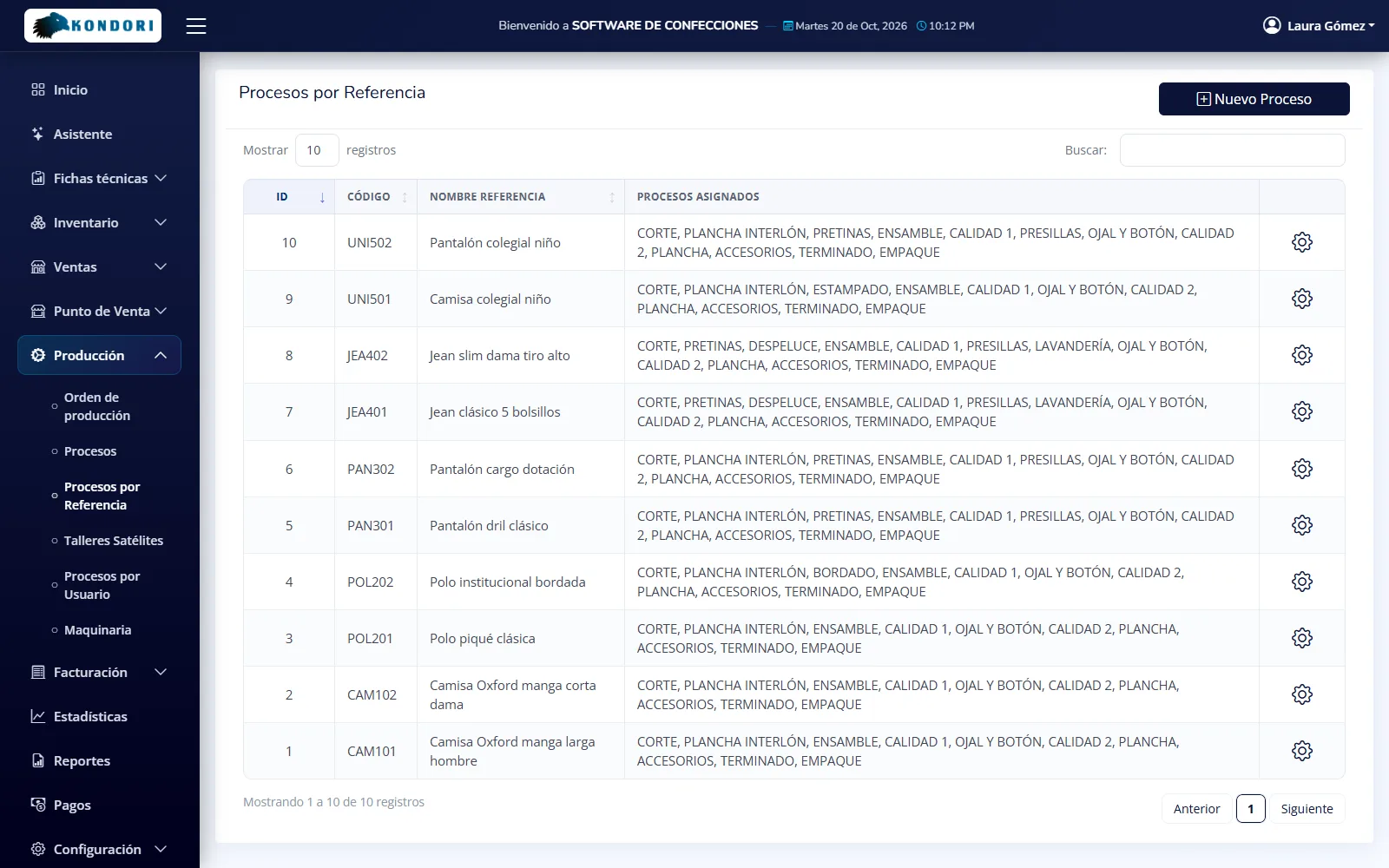
Each company creates its own processes with the name, code and sequence it uses: cutting, fusing, embroidery, printing, assembly, quality control, washing, buttonholes and buttons, finishing, packing or whatever you have. Then each style gets its own process route: jeans go through washing, a shirt doesn't.
- In-house and outsourced processes
- Mark which are done in-house and which go to sewing contractors (satellite workshops). Outsourced processes require a contractor and generate their own service order and payment.
- Route by style
- Each tech pack defines which processes the style goes through and in what order. The production order builds itself from that route and skips whatever doesn't apply.
- What each process consumes
- Cutting deducts the fabric and the final stage deducts the trims. Each process can have its own machinery, cost centers and labor services that add to the cost.
- Operators and contractors by process
- Assign which users move each process forward and which contractors provide it. Each one sees and records only their own work.
Production orders
Your whole factory floor in view, with a dashboard that warns you in time
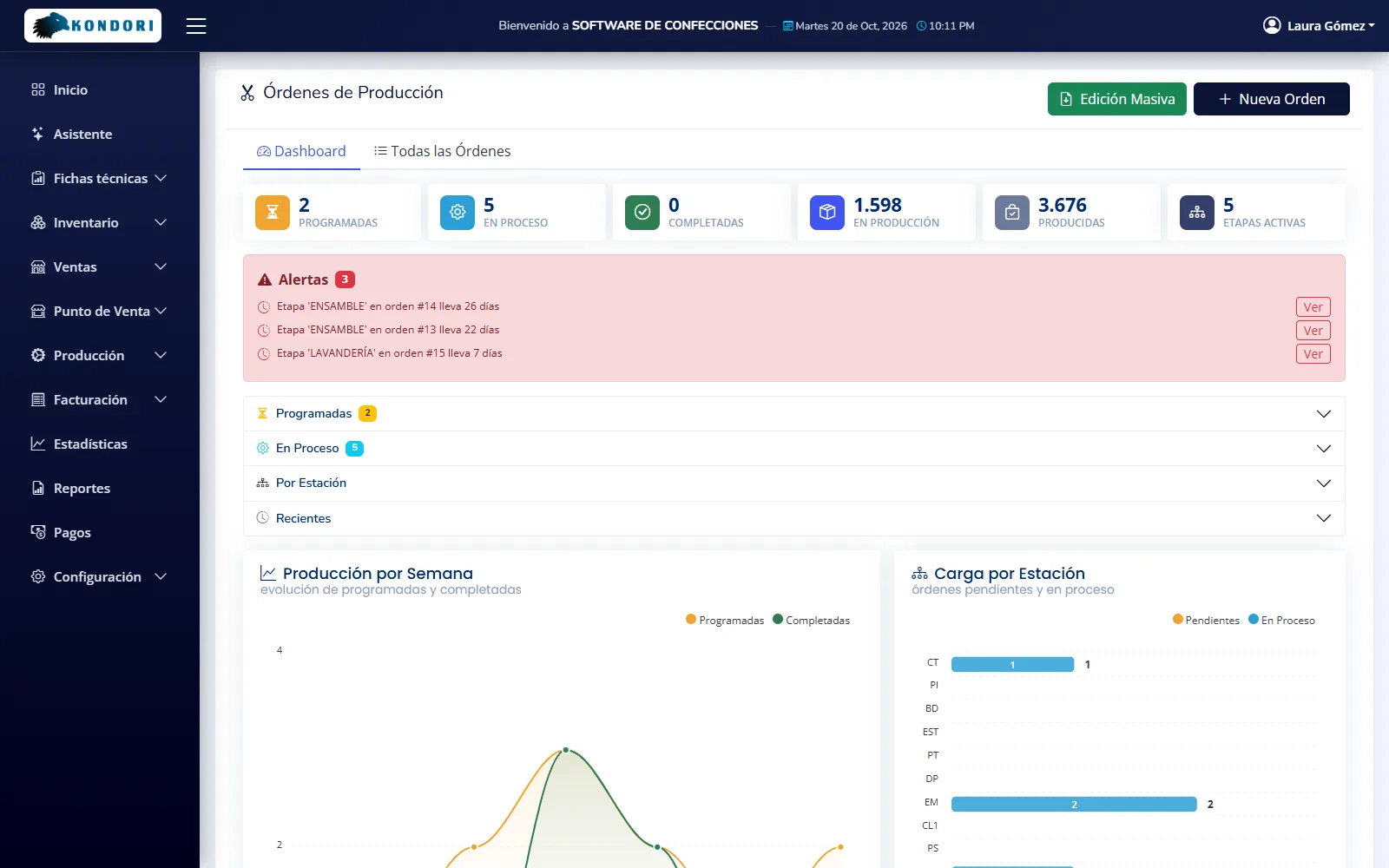
Production orders are created from open sales order quantities, by style, size and color. The dashboard shows how many orders are scheduled, in progress and completed, how many units are in production and which stages are falling behind.
- Factory floor KPIs
- Scheduled, in-progress and completed orders, units in production, units produced and active stages.
- Delay alerts
- Scheduled orders not yet started, bottlenecked stages, overloaded processes and too many orders on hold, with a direct link to each order.
- Weekly production
- Scheduled versus completed, week by week.
- Workload by process
- How many orders each stage has pending and in progress: cutting, embroidery, sewing, washing, finishing.
Order tracking
Every order, stage by stage, with its contractor and progress
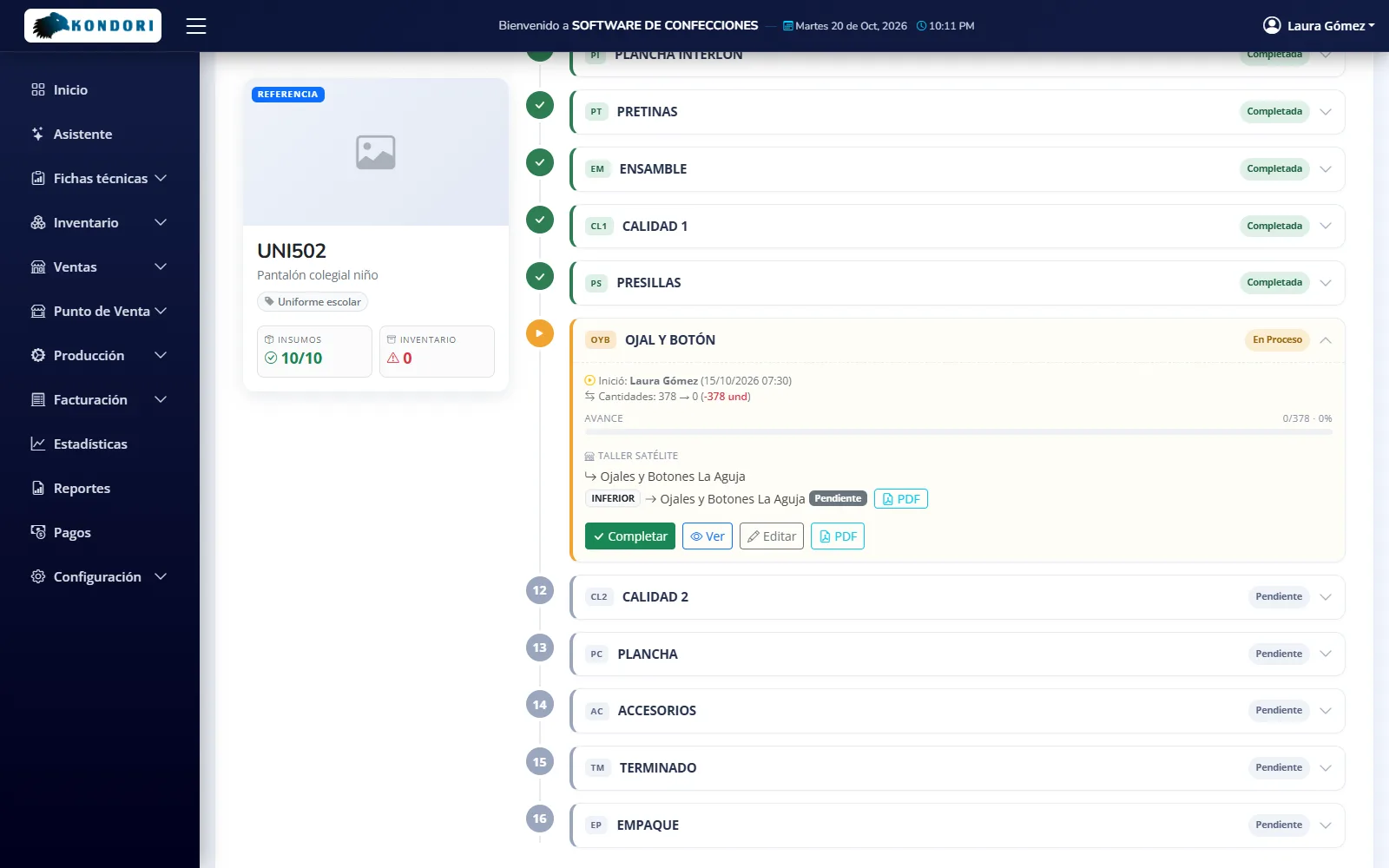
The order shows the style, materials and inventory status, the percentage complete and a timeline with every stage in its process route: who started it, when, with which sewing contractor and how many units are done.
- Fabric check when cutting starts
- If there isn't enough fabric for a color, the order doesn't start. Consumption is deducted by lot, first in, first out, and materials can be substituted.
- Sewing contractor by component
- Each outsourced stage with its own contractor, even a different one for the top and the bottom, and its service order (PDF).
- Scheduled and finished quantities
- Start, complete or skip each stage, with dates, price, notes and the units that actually came out.
- Processes by operator
- Each user moves forward only the stages assigned to them. The final stage receives the finished goods into the selected warehouse.
Bulk editing
Move hundreds of orders in minutes
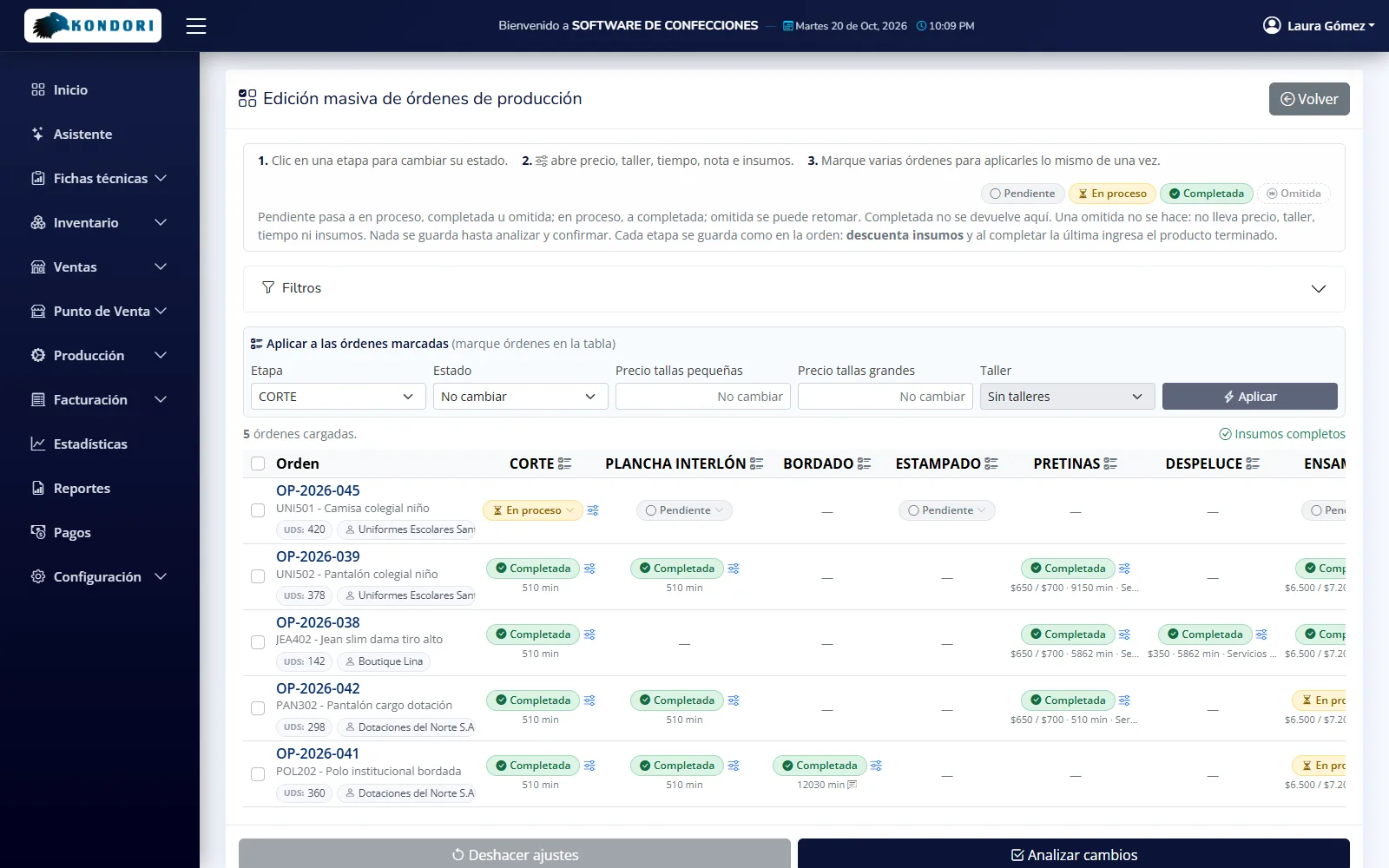
A grid with every order and the status of each stage. Select the orders, choose the stage and apply the status, price, contractor or minutes all at once. Nothing is saved until you review and confirm the changes.
- Every stage's status at a glance
- Pending, in progress, completed or skipped, by order and by stage, with filters by date, status and style.
- Apply to selected orders
- Prices for smaller and larger sizes, sewing contractor, minutes and actual materials for many orders at once.
- Missing materials warning
- Orders without enough materials are flagged before you move them.
- Review before saving
- The system shows what will change in each order, and each stage is saved exactly as it would be in the order itself: it deducts materials and receives the finished goods.
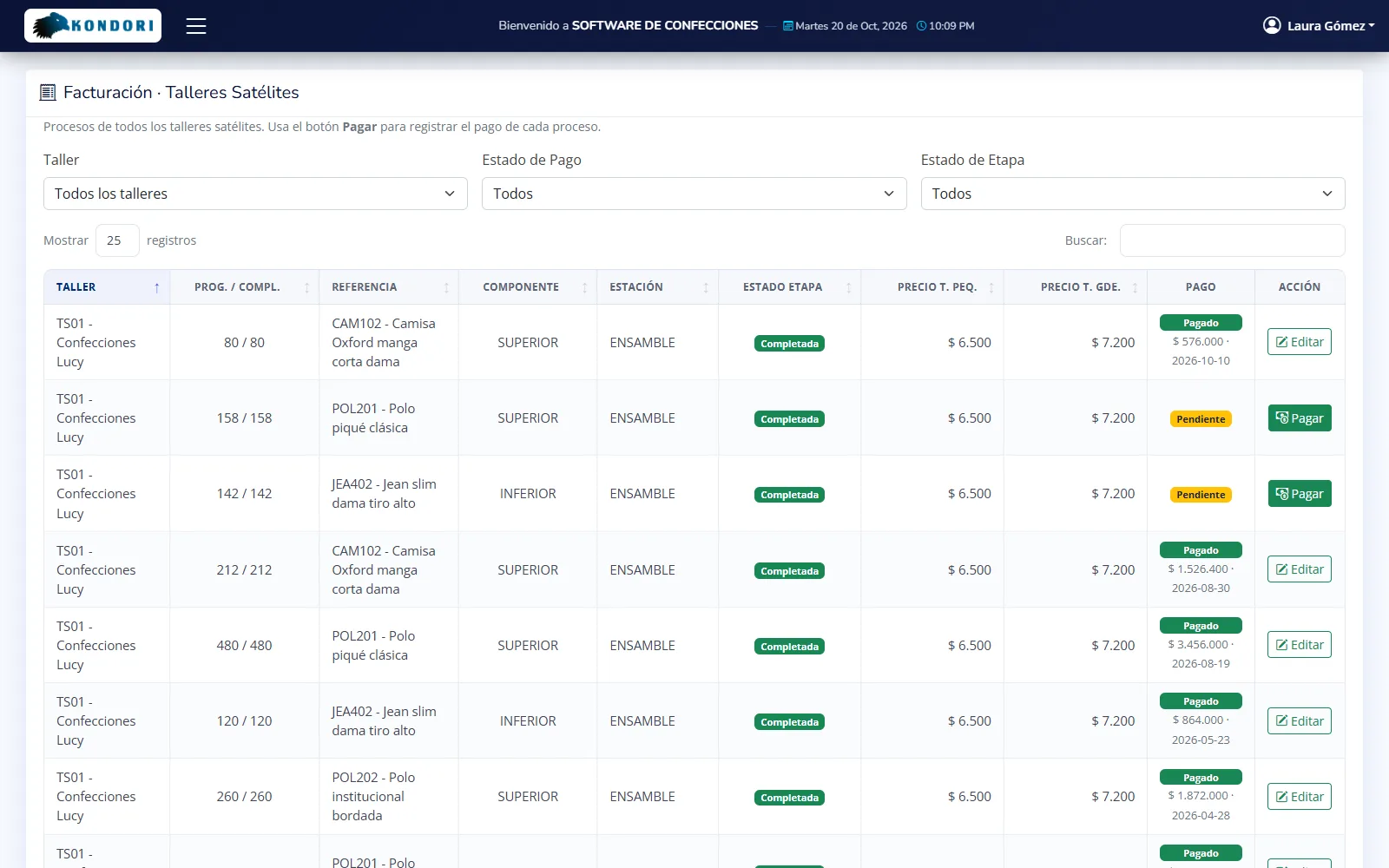
Sewing contractors
Full control over what's at each sewing contractor
Assign the stage, or each component, to a sewing contractor (satellite workshop). The hand-off goes out with its service order (PDF), what comes back is recorded, and payment is settled based on completed garments by size and color.
- Contractor directory
- Contractors with tax ID (NIT) or national ID, city and the processes they handle: sewing, embroidery, printing, washing, buttonholes and buttons.
- Received by component
- Tops and bottoms tracked separately, with dates: no piece gets lost between contractors.
- Payment settlement with supporting documents
- Suggested payment based on completed work, with prices for smaller and larger sizes or by color, attached supporting documents and paid or pending status.
Costing
Know what each garment really costs you
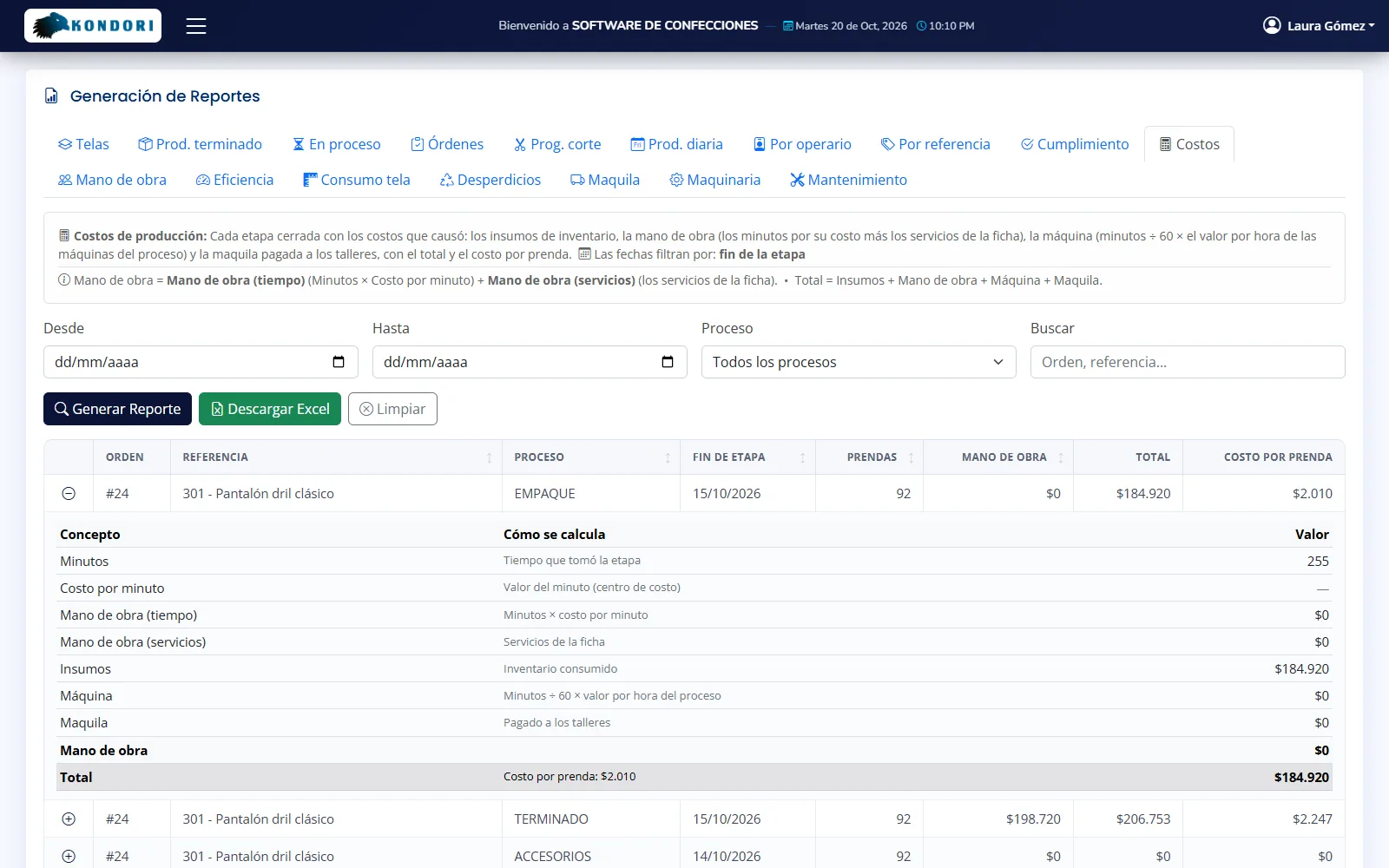
The tech pack calculates cost and price using materials at the actual lot value. With the Business plan, each order also adds what it really cost to produce, stage by stage.
- Style costing
- Materials plus fixed cost, markup factor by collection and profit percentage, with pricing by size group.
- Labor cost per minute
- Cost centers with the per-minute rate for each process, or the service price. Available on the Business plan.
- Machine time and sewing contractors
- Machine usage and payments to contractors are added to the order cost and the cost per garment. Business plan.
- Machinery
- A record for each machine with straight-line depreciation, book value, maintenance cost, hourly rate and the processes it's used in.
Fabric and materials inventory
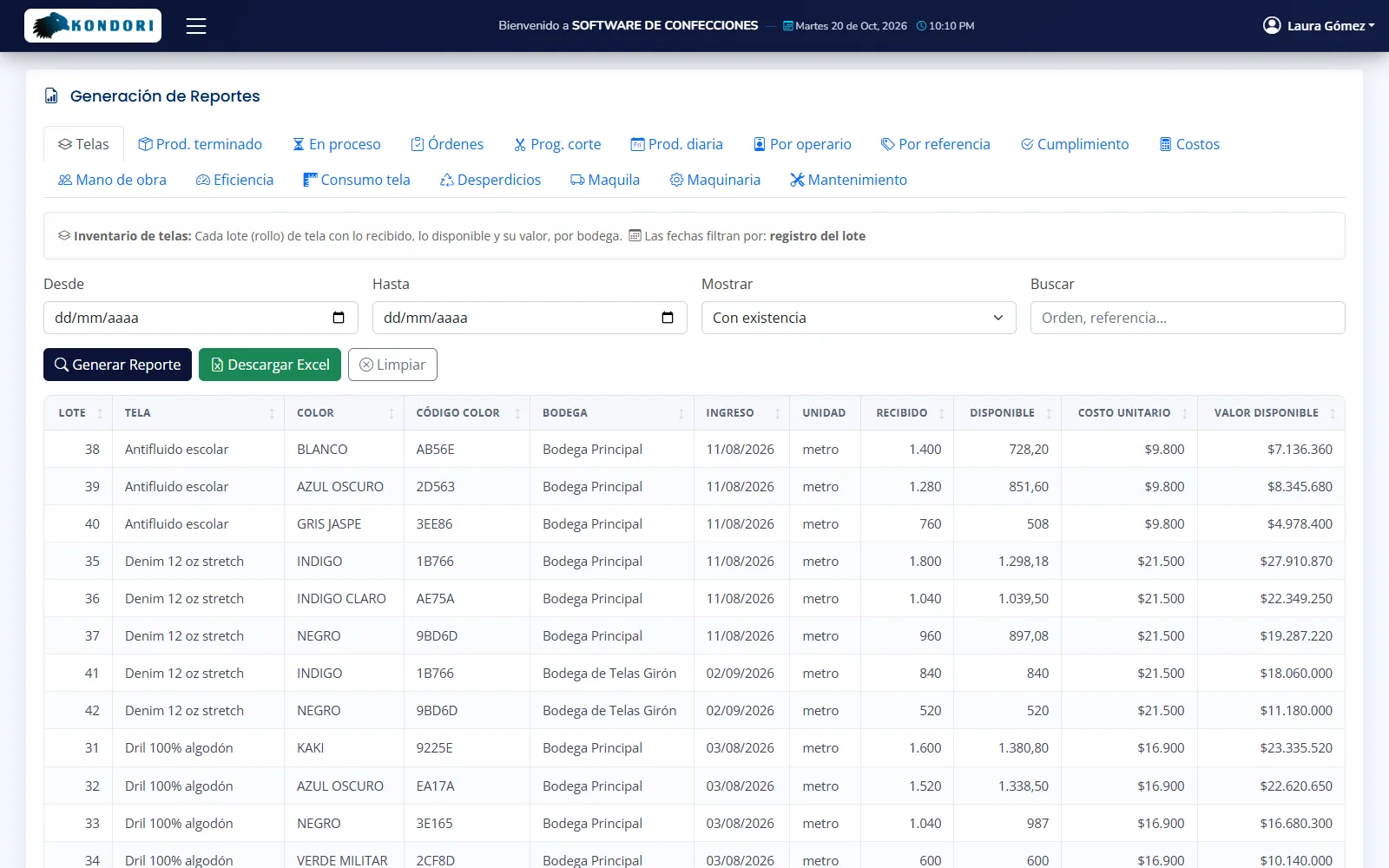
Fabrics and materials by lot, color and warehouse
Each purchase creates its lots with cost and color, and consumption is deducted first in, first out. Stock by warehouse, transfers and a stock ledger with running balance, for materials and for finished goods.
- Purchases and lot import
- Record the supplier invoice with detail by material and color, or import lots from Excel with a pre-check and rollback.
- Multiple warehouses and transfers
- Stock by warehouse, lot-by-lot material transfers and finished goods transfers using a barcode scanner.
- Controlled consumption and issues
- Material requisitions by department (cutting, sewing, embroidery, packing) and garment write-offs for damage, samples, shortages or waste.
Barcodes and shipping
Scanner-based shipping, without a single unit too many or too few
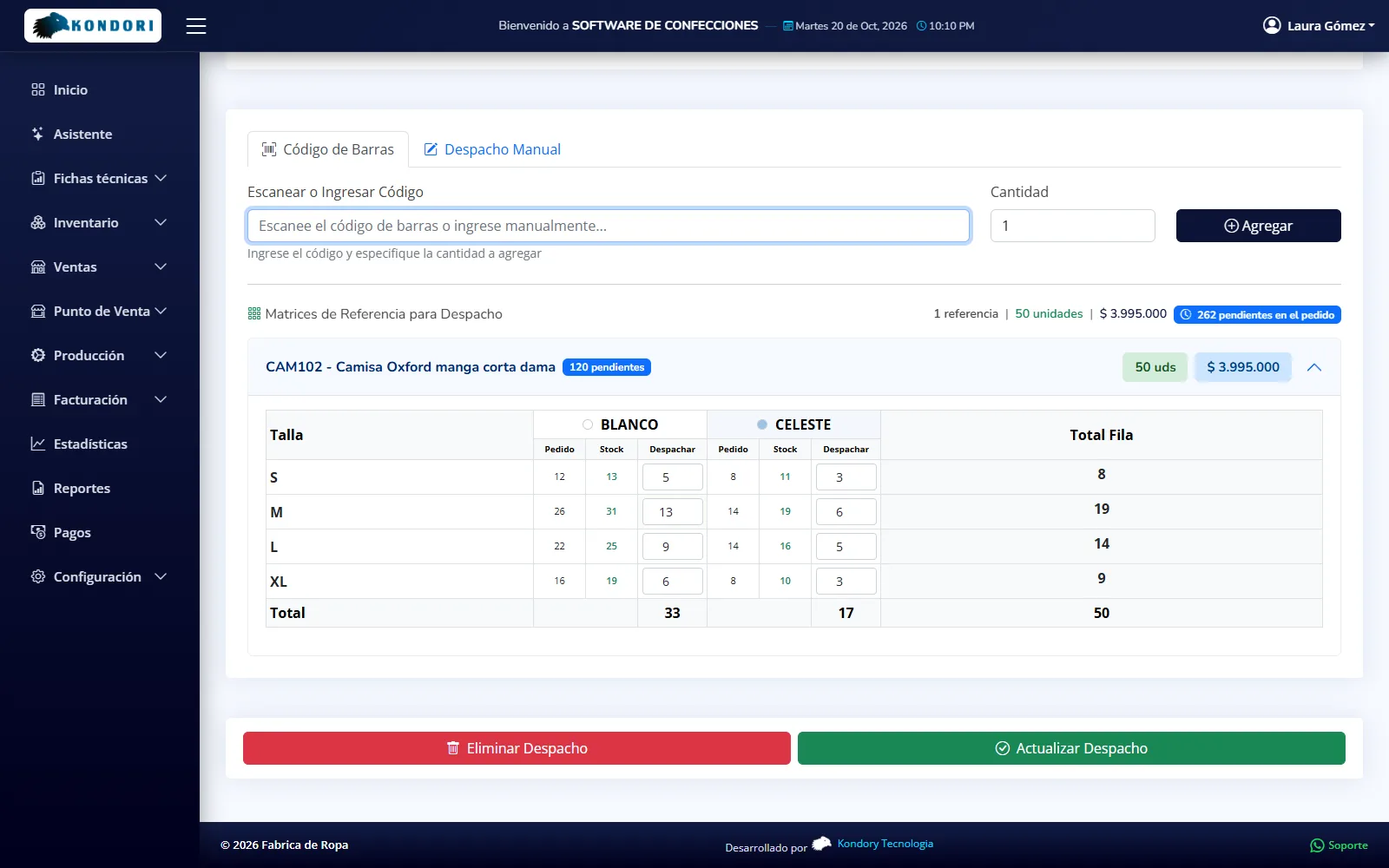
Barcode labels by size and color, and shipments built by scanning each garment against the order, with a barcode scanner or the phone camera. A shipment is saved complete or not at all.
- Thermal labels by market
- Code 128 in ZPL, TSPL or PDF, with each market's label design, and generation of any missing labels based on stock.
- Partial shipments
- Multiple deliveries per order, with backorders in plain view. Shipment types: sale, transfer, return or sample.
- Shipping invoice and accounting
- Each shipment is numbered, generates its PDF invoice, and the data is exported to WorldOffice or SIGO (Colombian accounting software).
Reports and analytics
Your company's KPIs, without building reports by hand
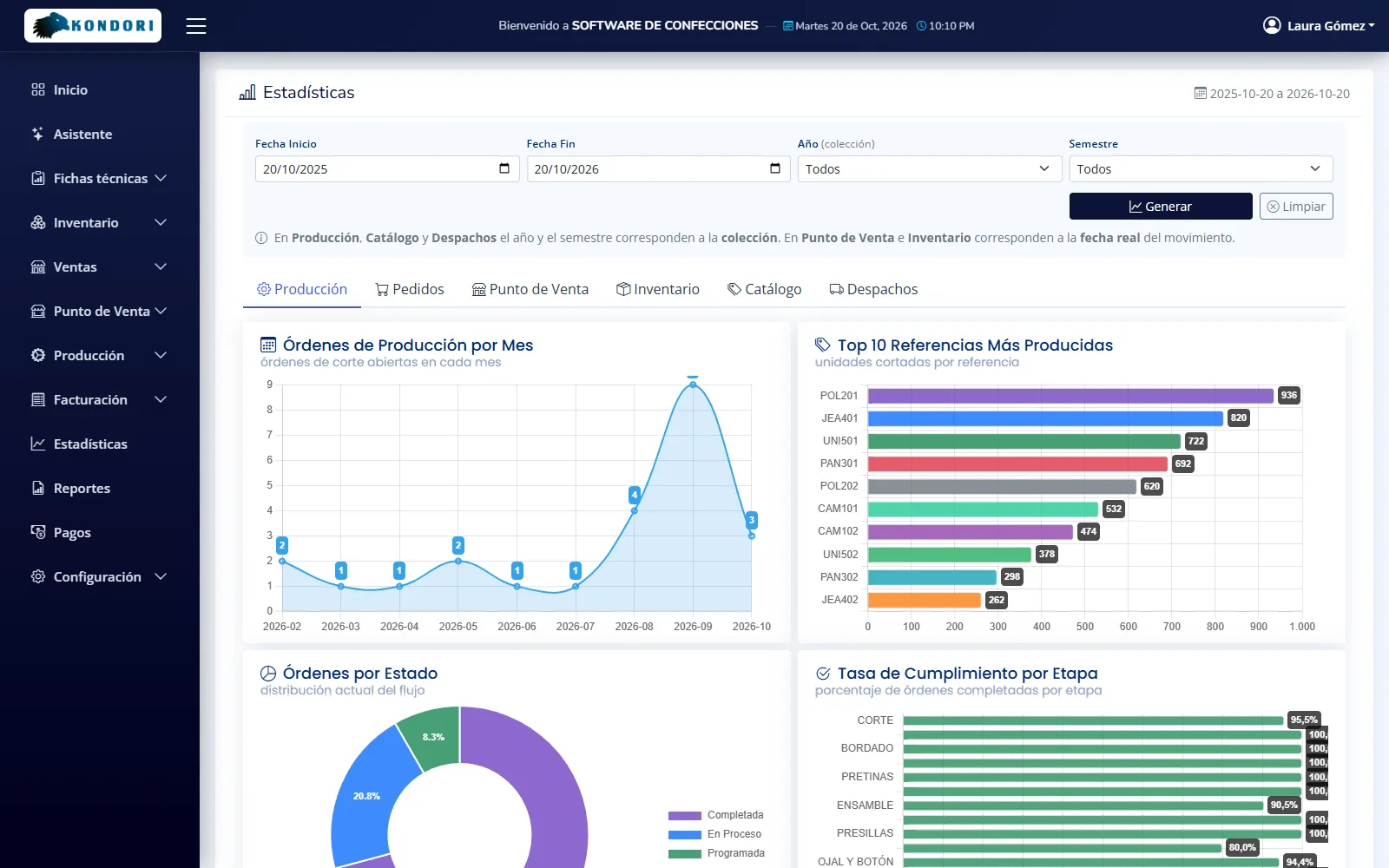
More than 40 charts across six areas (production, orders, point of sale, inventory, catalog and shipping) and 13 reports in Excel and PDF. The Business plan adds 17 production and costing reports.
- Production and fulfillment
- On-time rate and average time per stage, production progress and monthly order fulfillment.
- Sales and shipping
- Top styles and customers, backorders, monthly invoiced value and store traffic by day and hour.
- Inventory and catalog
- Stock turnover versus sales, critical stock, materials and finished goods inventory.
- Production and costing reports
- With the Business plan: fabrics, work in progress, daily and per-operator production, efficiency, waste and leftovers, contract manufacturing and machinery.
AI assistant
Ask your company anything, by text or voice
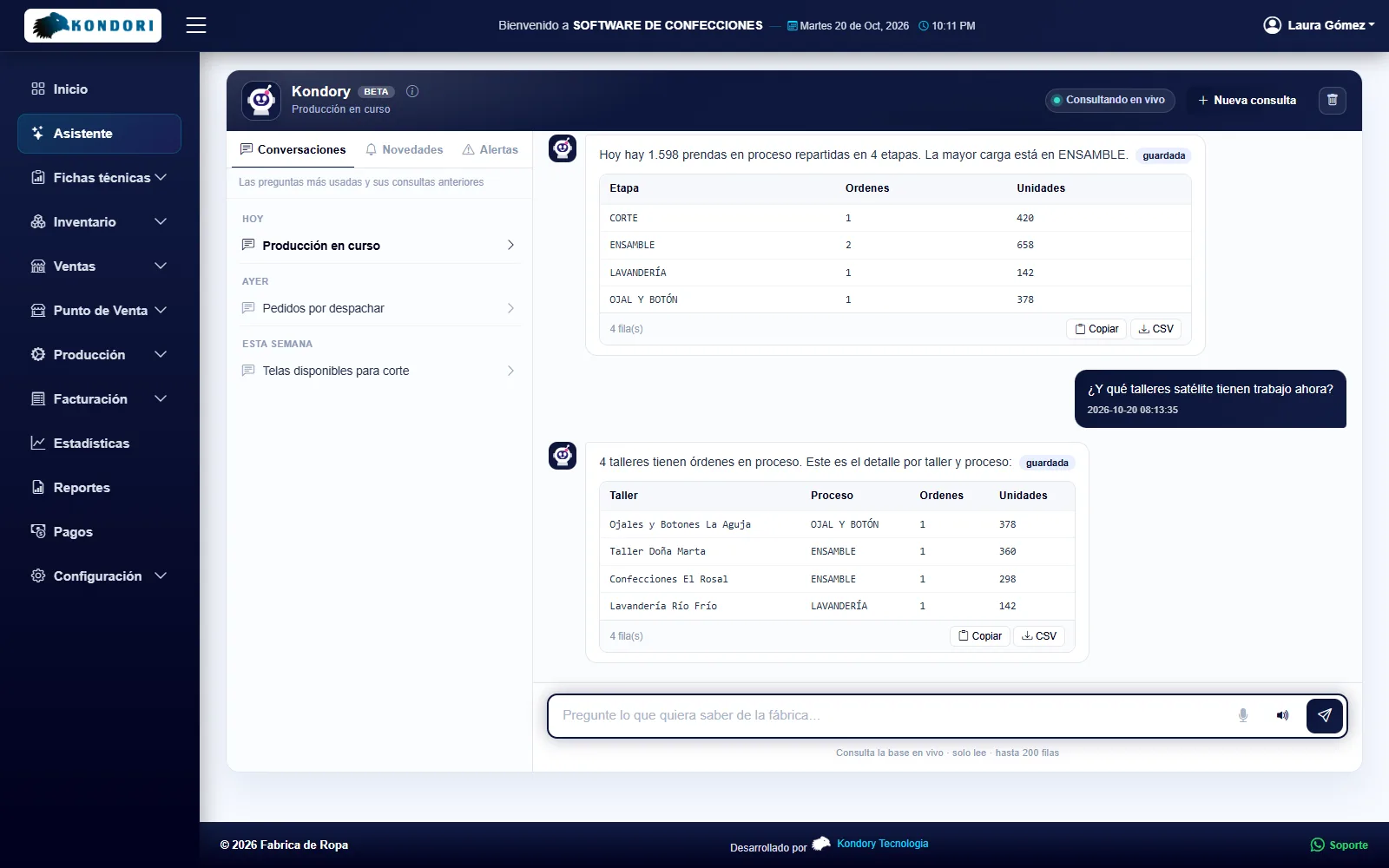
An assistant that answers in plain language using your system data: “Which styles sold best this month?”, “How many garments are in sewing?”. It's read-only: it doesn't create, change or delete anything.
- By text or dictation
- Type or dictate your question and get the answer with its table; you can also listen to it.
- Only what your role allows
- Each user can only query information from the screens they have access to.
- Eight information areas
- Styles, production, inventory, stock movements, point of sale sales, registers, orders and shipments.
Settings and control
Adapts to your company without custom development
The differences between one company and another are handled through settings: processes, size ranges, markets, labels and documents. And everyone works within their own role.
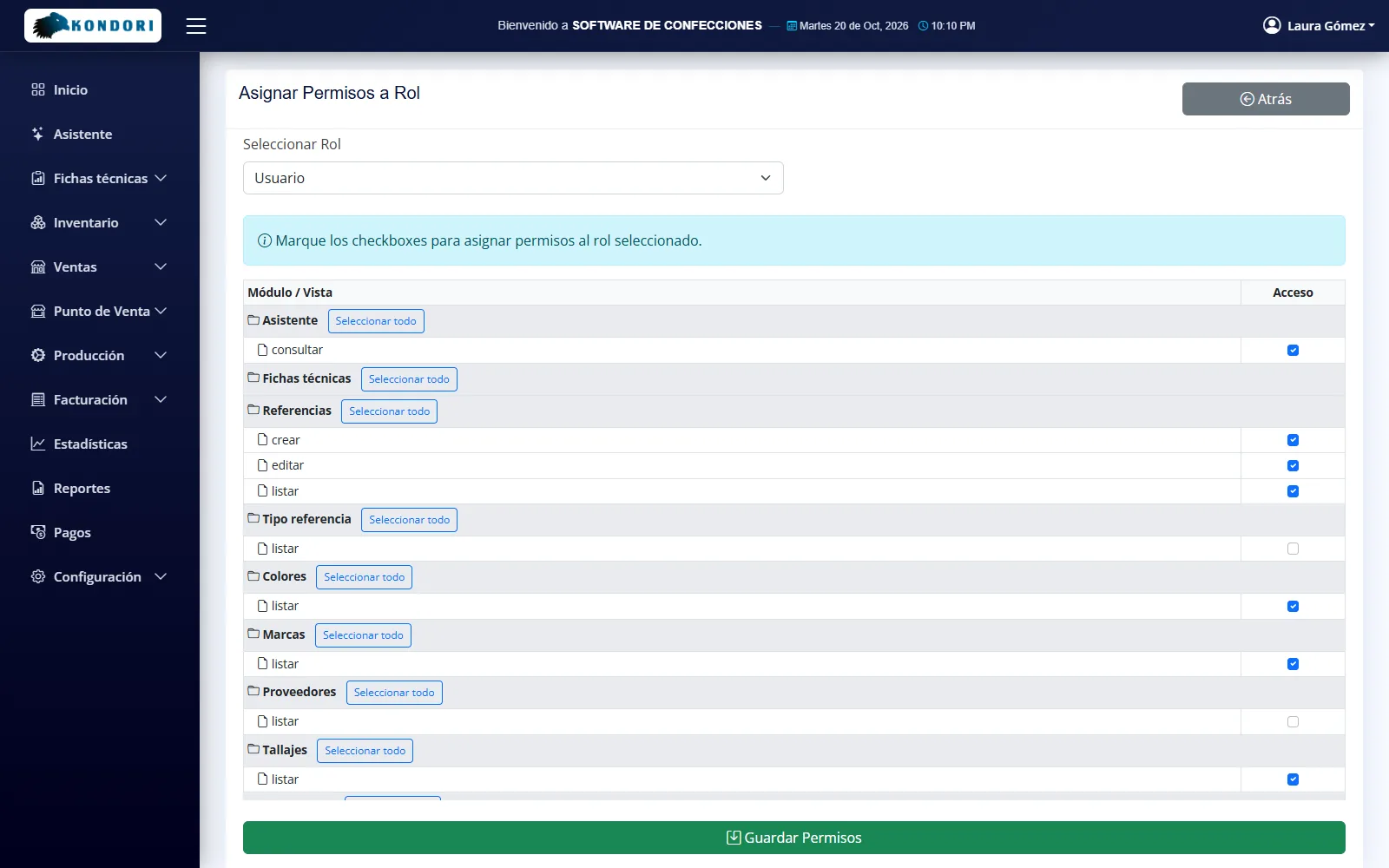
- Roles and permissions by screen
- The sales rep sees only orders, the cashier only sells and the operator only moves their own stages forward.
- Bulk imports with rollback
- A pre-check of the file, creation of anything missing and the option to roll back an entire import.
- Procedures manual
- A built-in manual with search and questions to the assistant, which each user sees according to their modules.
- Your company's branding
- Your logo, your company details and the platform color; label and printer settings.
And there's more
Details you'll notice every day
- In the cloud and on your phone
- Runs in the browser and scans barcodes with the phone camera for shipping, transfers and point of sale.
- Five PDF stage formats
- Cutting, washing and pressing, buttonholes and buttons, printing and embroidery, and assembly, for the factory floor and sewing contractors.
- Multiple warehouses and stores
- Materials and finished goods warehouses, and multiple stores, each with its own register.
- Collections by season
- Styles, orders and costs organized by year and half-year season.
- Base color and shades
- Processes that work only with the main color when the order includes shades or washes.
- Stock ledger with running balance
- Every materials and finished goods movement, by warehouse, with its balance.
- Accounting export
- Invoice and inventory in WorldOffice and SIGO formats (Colombian accounting software), ready for your accountant.
- Exchange rate
- Export prices in US dollars based on the exchange rate you set.
- Continuous updates
- Improvements reach every company without reinstalling anything.
Questions
Questions about the features
If your process has something unique, tell us about it in the demo.
Yes. You create your company's processes, in-house or outsourced, with their sequence, the materials they consume and their PDF format. Then you assign each style its production route.
Yes. The tech pack handles pricing by size group, by market and with color surcharges, and contractor payment settlement also distinguishes smaller and larger sizes.
When cutting starts, the system compares what's required with what's available by color and warehouse. If there isn't enough, the order doesn't start, and you can transfer from another warehouse, record the purchase or substitute the material.
It generates Code 128 labels in ZPL and TSPL for thermal printers, or in PDF for any printer, with size and margin calibration. We'll check your model during the demo.
It exports the invoice and inventory in WorldOffice and SIGO formats (Colombian accounting software). If you use other accounting software, tell us which one so we can review the export on the Business plan.
Want to see these modules with your own styles?
Book the demo and we'll prepare it with a garment from your catalog.